Geometry Dash Meltdown
RobTop GamesArcade
4.6153.09K Reviews
- Version
- 2.2.148
- Installs
- 100.00M
- Age Rating
- Everyone
Screenshots
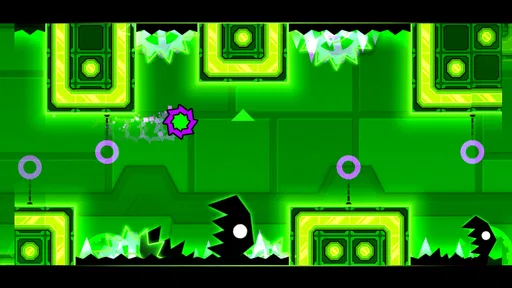
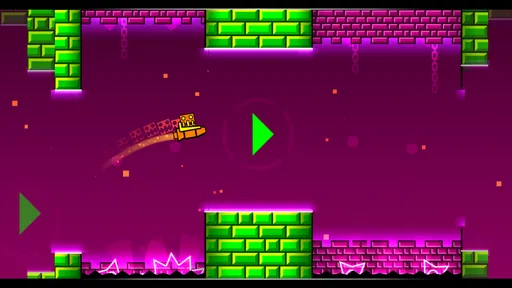
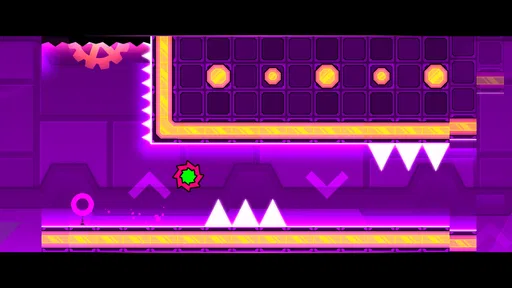
Our Review of Geometry Dash Meltdown
 Analysis by Appyee
If you’re deciding whether Geometry Dash Meltdown belongs on your phone, the main question is whether you enjoy repeating a short, demanding challenge until your timing clicks. I find it best approached as a focused arcade game rather than something to play casually while distracted. Its one-touch controls are easy to understand, but the precision it asks for is not easy to supply.
What I’d consider before downloading
This is a free arcade game from RobTop Games, released in 2015 and currently at version 2.2.147. It is rated for Everyone, has a 4.6 average from around 1.9 million ratings, and has passed 100 million installs. Those figures suggest a broad audience, but they do not mean the challenge suits every player. I’d choose it if you like learning by trying again; I’d skip it if a game feels unpleasant as soon as a mistake sends you back to retry.
The simplest way to decide is to ask what you want from a quick gaming break. If you want a level you can pause mentally and play on autopilot, this is a poor fit: the automatic forward movement leaves you responsible for reacting at the right moment. If you want a compact test of attention, where a few seconds of concentration can turn into a satisfying clear, its structure makes sense.
Why the rhythm and controls work together
The music is more than background decoration. Its pulse can help me anticipate a jump, but treating every obstacle as if it lands neatly on a beat is a mistake. I still have to watch the path and learn the level’s actual sequence. I use the track as an extra timing cue, not as a substitute for looking ahead; that distinction helps when a visual pattern feels less predictable than the music.
The single-tap control also makes practice easy to repeat. I don’t need to remember a complicated button layout, so when I fail, I can focus on what caused the failure: an early tap, a late one, or a missed visual cue. A useful habit is to change one thing at a time on the next attempt. Tapping earlier on every obstacle after a single mistake can make the next section worse; identifying the exact point where timing drifted gives each retry a purpose.
Playing with sound can make the rhythm easier to use, but it is not essential to understanding the basic control. If you are somewhere you need to keep quiet, you can still pay attention to the visuals and build familiarity through repetition. I find the soundtrack adds energy and a helpful sense of pace, while the obstacles themselves remain the information that matters most.
Where this arcade game wins
In the usual arcade alternatives, many games lean on brief reactions, score chasing, or simple survival. This one gives each attempt a more deliberate shape: you learn a fixed obstacle sequence and work toward completing it cleanly. That makes it especially appealing if you enjoy turning a run that once felt impossible into a series of recognizable cues.
A realistic use case is a short wait between errands. I can try a level, notice one troublesome jump, and use the next few attempts to understand its timing. The same loop can be absorbing during a longer break, but it is not ideal when I have only a moment and want guaranteed progress. A failed run may teach me something, yet it still may not end with a completed level.
Another practical tip is to treat a difficult section as a small learning problem, not a test of whether you have “good reflexes.” Watch what happens immediately before the obstacle, then decide whether the cue is visual, musical, or a combination. That makes practice less random. It also helps separate a genuine timing issue from a moment when you simply were not paying attention.
The game is a strong match for players who like precision platforming, energetic music, and the satisfaction of mastering a sequence. It is less suitable for someone who wants many different activities in one app, a relaxed pace, or an experience built around exploring freely. The focused design is a strength when you want a clear skill challenge, but a limitation when you are looking for variety from one session to the next.
Gameplay and Mechanics
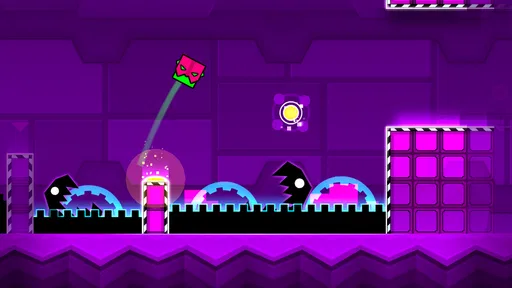
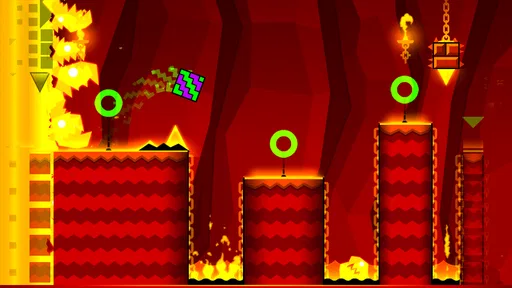
Geometry Dash Meltdown is all about timing and precision. You control a small cube that automatically moves forward, and your job is to jump over spikes, dodge obstacles, and navigate through intricate levels. The catch? Everything is synced to the beat of the music, so having a good sense of rhythm can be your greatest ally.
What makes this game stand out is its simplicity in controls — just a single tap to jump. But don’t be fooled; mastering the jumps and timing them perfectly is where the real challenge lies. Each level is designed to test your reflexes and patience, requiring you to learn patterns and adapt quickly.
Graphics and Soundtrack
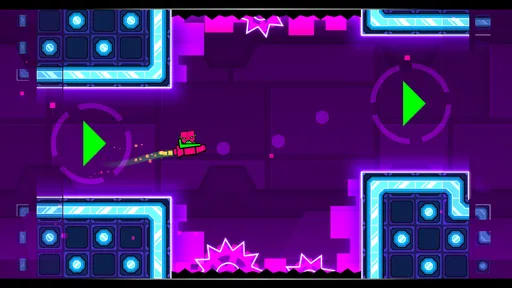
The graphics are vibrant and colorful, which is exactly what you’d expect from a game that’s as lively as this one. Each level has a different theme, and the visuals are perfectly synced with the music, creating an immersive experience.
Speaking of music, the soundtrack is one of the game’s strongest features. The tracks are catchy, high-energy, and incredibly motivating. They’re crafted to enhance the gameplay, making each jump and dodge feel part of an epic dance. It’s like having a mini rave party in your pocket!
Level Design and Difficulty
The levels in Geometry Dash Meltdown are masterfully designed. They start off relatively simple, introducing you to the basic mechanics, but quickly ramp up in difficulty. Each level has unique challenges and obstacles, keeping the gameplay fresh and exciting.
However, be prepared to fail. A lot. The game is notoriously difficult, and it demands perfection. But that’s part of its charm. Every time you fail, it’s a learning experience. You start to notice patterns, anticipate obstacles, and improve your timing. The sense of accomplishment when you finally complete a level is unmatched.
Replay Value and Community
One of the best things about Geometry Dash Meltdown is its replay value. Even after completing all the levels, you’ll find yourself coming back to beat your scores or perfect your runs. The game also has a vibrant community of players who share tips, tricks, and even create their own levels.
Although the game doesn’t have a level editor like its predecessor, the existing levels are challenging enough to keep you engaged for hours. Plus, playing along with friends and competing for high scores adds a social element that makes the game even more addictive.
Choosing it over other options
If you are weighing it against a more relaxed platform game, the trade-off is clear: this one prizes exact timing over wandering around or experimenting with a large space. If you are comparing it with endless-runner-style arcade games, its appeal is less about surviving indefinitely and more about learning a designed route. I’d pick it when I want a repeatable skill test; I’d choose another kind of arcade game when I want varied objectives or less punishing progress.
It is also worth distinguishing this focused experience from the broader appeal of a level-building game. The original article notes that this version does not have a level editor like its predecessor, so players who mainly want to create, browse, or continually discover user-made stages may prefer a different entry in the series. Here, the attraction is tackling the included courses rather than making the game into a construction toolkit.
That difference affects replay value. Repeating a level can be rewarding if you enjoy refining a route, but it can feel narrow if you need new content to stay interested. Before settling in for a long session, I’d ask myself whether I’m enjoying the process of improving or merely hoping the next attempt will be easier. If it is the latter, taking a break is often a better choice than turning a sharp arcade challenge into a frustration loop.
Making retries more useful
One non-obvious benefit of a fixed sequence is that every failure can narrow down what you need to learn. Rather than trying to improve the whole run at once, I focus on the obstacle that repeatedly catches me and pay attention to the cue just before it. Once that moment feels familiar, the challenge becomes less like guessing and more like executing a response. This approach suits short play sessions because it gives even an unsuccessful attempt a clear purpose.
There is a trade-off, though: the same repetition that makes progress measurable can make a level feel demanding when you are tired. I would not use it as a wind-down game if repeated resets tend to irritate you. When concentration is low, a quick session may be better spent stopping after a few tries than pushing through and blaming the controls for mistakes caused by fatigue.
For touch play, a calm, deliberate tap is more useful than frantic tapping. Since the control is simple, the challenge is not learning a button combination but judging when to use the one action available. Keeping your attention on the approach to an obstacle, rather than reacting only when it is already close, is a practical way to make attempts more consistent.
Who should keep playing, and who should move on
I recommend giving it a try if you enjoy rhythm-informed platforming, like repeating a challenge to improve, and do not mind that progress can come after many failed attempts. It is also an easy game to understand before deciding whether its particular kind of difficulty appeals to you. The free price removes the need to commit money just to find out whether the timing-based loop is your kind of fun.
I would steer away from it if you want a generous, forgiving experience, broad exploration, or substantial variety within each session. It can also be a poor choice when you need a game that works well with divided attention: automatic movement does not make it a hands-free or low-focus activity. The age rating is Everyone, but the intensity of the challenge may still be too much for players who dislike repeated failure.
People often wonder whether rhythm knowledge is required. In my view, it helps, but the more important skill is paying attention and learning the level. The soundtrack can support your timing, yet you do not need to be a musician to attempt the jumps. If the beat and obstacles seem overwhelming at first, slow down your decision-making and focus on one visual cue at a time.
Another likely question is whether it stays enjoyable after the first clear. That depends on what you value: returning to improve a run can be compelling, while players who need a constant supply of new stages may reach the limits of this focused format sooner. The ability to replay is meaningful, but replaying is not the same thing as discovering entirely new content.
As for whether to switch to another Geometry Dash experience, I would base that choice on what you want to do next. If you want the specific included levels and a concentrated challenge, there is no need to switch just because the game is difficult. If creating levels or seeking a broader range of community-made material is your priority, an entry with an editor is a better match. The key is choosing by play style rather than assuming every game with a similar name offers the same experience.
Final Thoughts
Overall, Geometry Dash Meltdown is a fantastic addition to any mobile gamer’s library. It’s challenging, visually appealing, and has a killer soundtrack that makes you want to keep playing. While the difficulty might be daunting for some, the game offers a rewarding experience for those who stick with it.
So, if you’re ready for a challenge and want to test your reflexes and rhythm, give Geometry Dash Meltdown a try. Just be prepared for some epic victories and equally epic fails. Happy jumping!
Privacy and Permissions
See what permissions an app requests and how it handles your data.
- Photos/Media/Files
- read the contents of your USB storage, modify or delete the contents of your USB storage
- Storage
- read the contents of your USB storage, modify or delete the contents of your USB storage
- Wi-Fi connection information
- view Wi-Fi connections
- Other
- view network connections, full network access, control vibration, prevent device from sleeping, Google Play license check
Verdict
Strengths of Geometry Dash Meltdown
- Engaging levels with unique challenges.
- Simple controls, easy to learn.
- Vibrant graphics and dynamic soundtrack.
- No in-app purchases required.
- Offline play available.
Limitations of Geometry Dash Meltdown
- Limited levels compared to full version.
- May feel repetitive over time.
- Ads can be intrusive.
- No customization options for characters.
- High difficulty may frustrate some players.
Other Releases by RobTop Games
View All
Geometry Dash Lite
Arcade4.4

Geometry Dash World
Arcade4.5

Geometry Dash SubZero
Arcade4.5

Geometry Dash
Arcade4.7
Similar Picks in This Category
View All
Subway Surfers
SYBO Games4.6

Stickman Party 234 MiniGames
PlayMax Game Studio4.6

Subway Princess Runner
Ivy4.4

Temple Run
Imangi Studios4.2

Zombie Tsunami
Mobigame SAS4.6

Stack Ball - Crash Platforms
CASUAL AZUR GAMES4.5
Frequently Asked Questions
What is Geometry Dash Meltdown and how does it differ from the original Geometry Dash?
Geometry Dash Meltdown is a rhythm-based platformer game that builds on the original Geometry Dash. It features three new levels with unique soundtracks and obstacles, bringing a fresh experience to fans of the series. While it maintains the core gameplay mechanics, it introduces new challenges and visual themes that differentiate it from its predecessor.
Is Geometry Dash Meltdown free to play, and are there any in-app purchases?
Yes, Geometry Dash Meltdown is free to download and play. However, like many free apps, it includes ads and offers in-app purchases. Players can opt to buy additional features or remove ads entirely. These purchases are optional and are not necessary to enjoy the full game experience.
What devices and operating systems are compatible with Geometry Dash Meltdown?
Geometry Dash Meltdown is available on both Android and iOS platforms. For Android, it typically requires version 4.0 or higher, while iOS devices should have iOS 8.0 or later. It's optimized for both smartphones and tablets, ensuring a smooth gaming experience across different devices.
Can I play Geometry Dash Meltdown offline, or do I need an internet connection?
Geometry Dash Meltdown can be played offline, which makes it an excellent choice for gaming on the go. However, certain features like leaderboard access or in-app purchases will require an internet connection. Playing offline ensures uninterrupted gameplay without ads popping up.
What are the main gameplay features and challenges in Geometry Dash Meltdown?
Geometry Dash Meltdown is renowned for its fast-paced and challenging gameplay, requiring players to jump, fly, and flip through dangerous paths. The game emphasizes precise timing and quick reflexes. Each of the three levels is accompanied by a unique soundtrack that synchronizes with the action, enhancing the immersive experience.
Play our best games!


